< Blog HomeKollaborate Server 2026.1.1 - new link commenting flow, major architecture overhaul and more
Kollaborate Server 2026.1.1 is now out, with some significant changes to our self-hosted workflow platform.
New Link Commenting Flow
We've overhauled how commenting works for shared links. The order of operations is now reversed: the user enters their comment first and is then asked for their name. This improves user-friendliness and solves situations where users couldn't figure out how to enter a comment or entered their comment in the name field by mistake. This is just for the first comment; they are not asked for subsequent comments.
This is not necessary when sending emails directly from Kollaborate, as Kollaborate will assign their name as the first part of their email address.
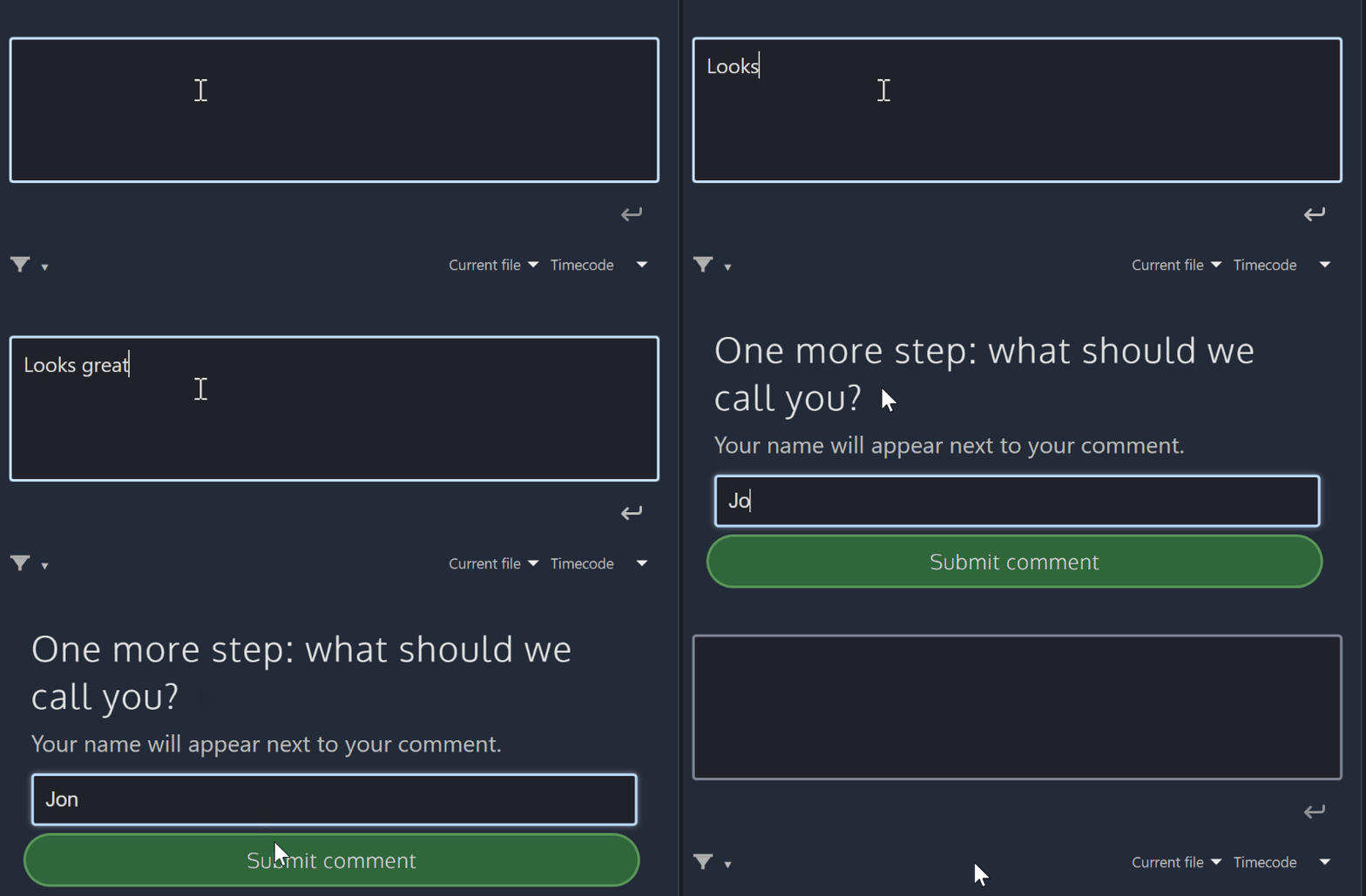
Physical comment submit button
There is now a physical submit button for the comment box. This solves issues where some users could not work out how to submit a comment. You can still submit comments by pressing Enter.

Major architecture overhaul
We've made significant changes to how uploads and encoding jobs work behind-the-scenes, including rewriting most of our uploading code. Most of these changes are intended for the cloud and will not have noticeable effects when self-hosting, but you may notice slightly faster uploads.
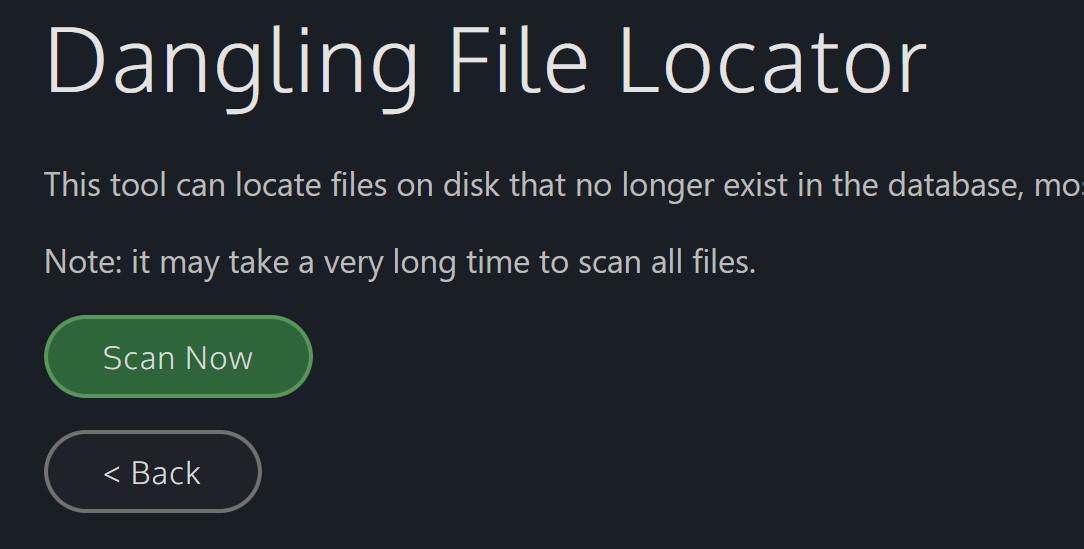
New admin tool: Dangling File Locator
This tool helps you locate files that exist on disk but aren't in the database. This can occur if the file was scheduled for deletion but permissions issues prevented it from being deleted.
Improved accessibility
We've increased the contrast of some user interface controls to be more accessible, as well as improving how the site appears on screen readers. We plan more improvements in this area in future updates.
Other changes
- HAProxy will now automatically restart when new LetsEncrypt certificates are ready
- Thumbnails now use WebP
- Fixed an issue where not all permissions may be imported when importing custom roles from another project
- Fixed an issue where the duration overlay on a file's icon may not appear if the file exceeded 3 hours in duration
- History / Webhooks - Fixed an issue where newlines would not be interpreted correctly in history data
- Fixed an issue where captions would not be shown on-screen on mobile
- Fixed an issue that could prevent deleted files being removed from disk
- Fixed an issue where tags could not be added with square brackets surrounding the tag
- Player - Fixed an issue where clicking the banner to download an unplayable file wouldn't work
- Comments - Fixed an issue where link recipients could see buttons only relevant to logged-in users, such as Favorite and Make To-Do
- Uploads - Fixed an issue where uploading a file revision may not apply scoped workflows
- Webhooks - Fixed an issue where it may not send a signature for long results
- Comments - Fixed an issue where changing the author filter wouldn't update the list of comments
- Files - Fixed an issue causing title misalignment when opening a file in a new tab
- Workflows - Added an option to view all comments when creating a share link action in a File Workflow
- Trash - Fixed an issue where the page will crash if a file is deleted by a user whose account is then deleted
- Sharing - Fixed an issue preventing some links from rendering
- Player - Fixed an issue where PDF proxies of document files may not render in the player
- Fixed an issue where aliases would not work correctly when downloading a folder as a zip file
- Fixed an issue where proxies sometimes wouldn't download
- Fixed an issue where files with extremely long filenames might become inaccessible after uploading
- Fixed an issue causing some database passwords to not work correctly
- Fixed an issue where deleting a version would delete all versions
- File Deletion - Made trashing large quantities of files significantly faster
- Server performance improvements
- General bug fixes, tweaks and optimizations
Kollaborate is an essential cloud workflow platform that allows you to share files with clients and team members while integrating with Digital Rebellion apps and services. Kollaborate Server allows you to host the platform in-house on your own servers and storage. To find out more, see the Kollaborate Server overview or register for the free cloud trial (Server trials are available on request).
Posted by Jon Chappell on Feb 10 2026 to
DR News,
Front Page News,
Kollaborate  KollaborateCloud platform for pro video
 Pro Maintenance ToolsMaintain, optimize and troubleshoot your editing system
 Pro Media ToolsMedia and workflow management for video pros
 CinePlayProfessional video player
 Post HasteCreate projects from customizable templates
 Preference ManagerTrash, backup, lock and restore preferences for your video apps
 FCS RemoverUninstall Final Cut Studio and FCPX
 Cut Notes
 CinePlay
 Aspect Ratio Matte Generator
 Video Space Calculator
