Kollaborate Quarterly Update - Q3 2026
This quarter we built our own custom encoding server hardware. This is designed to be very fast at encoding: we can process 4x as many files at once, and each file converts 2x-10x faster depending on the source format. So the total throughput increase is up to 40x compared to our old encoders.
The speed boost was also helped by the fact that we wrote new encoding software from scratch. The new software provides faster processing, improved parallelism, and more efficient caching and resource usage.
As well as being faster, the new encoders will enable us to improve video quality and add new metadata scanning capabilities. We’re not quite ready to switch those on just yet, but they will be coming soon.
Note that we haven’t decommissioned all of our old encoders yet, so some jobs may still get the old encoders and won’t be as fast. We plan to switch off the last of the old encoders soon.
Other Changes
We stabilized our new player and moved all users to the new version of the site. You can read more about those changes here.
Other changes include that you can now right-click a group of files and export their metadata as CSVs inside a zip file, as well as batch removing a user from all projects you own at once.
What's coming next
We continue to work on help center improvements, captions overhaul, backend modernizations and Single Sign-On.
Kollaborate is an essential cloud workflow platform that allows you to share files with clients and team members while integrating with Digital Rebellion apps and services. To find out more, see the overview or register for the free trial.
Posted by Jon Chappell on Sep 23 2026 to
DR News,
Front Page News,
KollaboratePermalinkRecent updates - August 2026
In case you missed it, here are some recent software updates for our products.
Pro Media Tools 2.2.1 - Jul 27 2026
- Video Check - Improved stability
- Improved compatibility with newer versions of macOS
- Lots of small UI tweaks
- General bug fixes, tweaks and optimizations
CinePlay 1.7.5 - Jul 23 2026
Important: We'll be making changes soon to digitalrebellion.com that will make it so that it's no longer possible to register old versions of CinePlay. Older versions will work if they are already registered, but we recommend new registrations use 1.7.4 or higher.
- Fixed an issue where markers could be misaligned in the timeline
- Minor bug fixes, tweaks and optimizations
Kollaborate Server 2026.2.2 - Jul 23 2026
Important: The Docker image is configured to convert the current database to your MariaDB version automatically. As such, we would recommend backing up the database before upgrading to any version as you may be unable to downgrade otherwise. You can download the current database as a .sql file from the Tools section of the Admin Area. We recommend doing this BEFORE copying the newer version's files over.
Changes in this version:
- Support for version 1.1 of the Kollaborate Adobe panel
- Tasks - Allow task assignees to change the status of the task
- Player - Don't show "your browser can't play this file" for files that wouldn't be expected to be playable in a browser
- Player - Fixed an issue where users with "modify others' files" permission but not admin could not change the workflow for a file
- API - Fixed an issue where thumbnails could be black
- API - More robust thumbnail generation
- API - Improved compatibility with CinePlay for iOS
- Better support for older browsers
- Lots of small bug fixes, tweaks and optimizations
Kollaborate Premiere Panel for Windows 1.1 - Jul 23 2026
Although there are no new user-facing features right now, this is a significant reworking of the panel for better support in newer versions of Premiere. It now requires Premiere 25.6.0. If you are self-hosting you'll need Kollaborate Server 2026.2.2 or higher.
Note: the plugin now appears in the UXP Plugins menu.
Kollaborate Premiere Panel for Mac 1.1 - Jul 23 2026
Although there are no new user-facing features right now, this is a significant reworking of the panel for better support in newer versions of Premiere. It now requires Premiere 25.6.0. If you are self-hosting you'll need Kollaborate Server 2026.2.2 or higher.
Note: the plugin now appears in the UXP Plugins menu.
Posted by Jon Chappell on Aug 7 2026 to
DR NewsPermalinkRecent updates - July 2026
In case you missed it, here are some recent software updates for our products.
CinePlay 1.7.4 - Jul 3 2026
Important: We'll be making changes soon to digitalrebellion.com that will make it so that it's no longer possible to register old versions of CinePlay. Older versions will work if they are already registered, but we recommend new registrations use 1.7.4 or higher.
- Improved registration reliability
- Improved compatibility with newer versions of macOS
- Improved compatibility with newer versions of Kollaborate
- Minor bug fixes, tweaks and optimizations
Kollaborate Server 2026.2.1 - Jun 24 2026
Important: The Docker image is configured to convert the current database to your MariaDB version automatically. As such, we would recommend backing up the database before upgrading to any version as you may be unable to downgrade otherwise. You can download the current database as a .sql file from the Tools section of the Admin Area. We recommend doing this BEFORE copying the newer version's files over.
Changes since 2026.1.1:
- This version features a brand new video player and image viewer with an improved user interface and features like switching between proxies, better error handling and error messages, speaking captions out loud for accessibility, better mobile support, and the ability to add overlays like safe areas and aspect ratio mattes
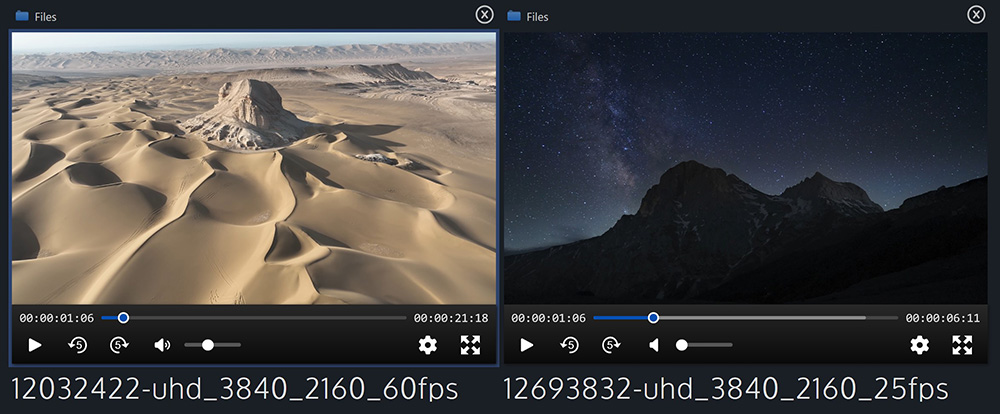
- Side-by-side comparison - load two players at once and compare them with playback synchronization for video/audio, zoom/pan synchronization for images, and page sync for documents. Switch between comments independently of whichever file is the active file. You can load any type of file alongside another for reference, but only files of the same type can be synchronized.
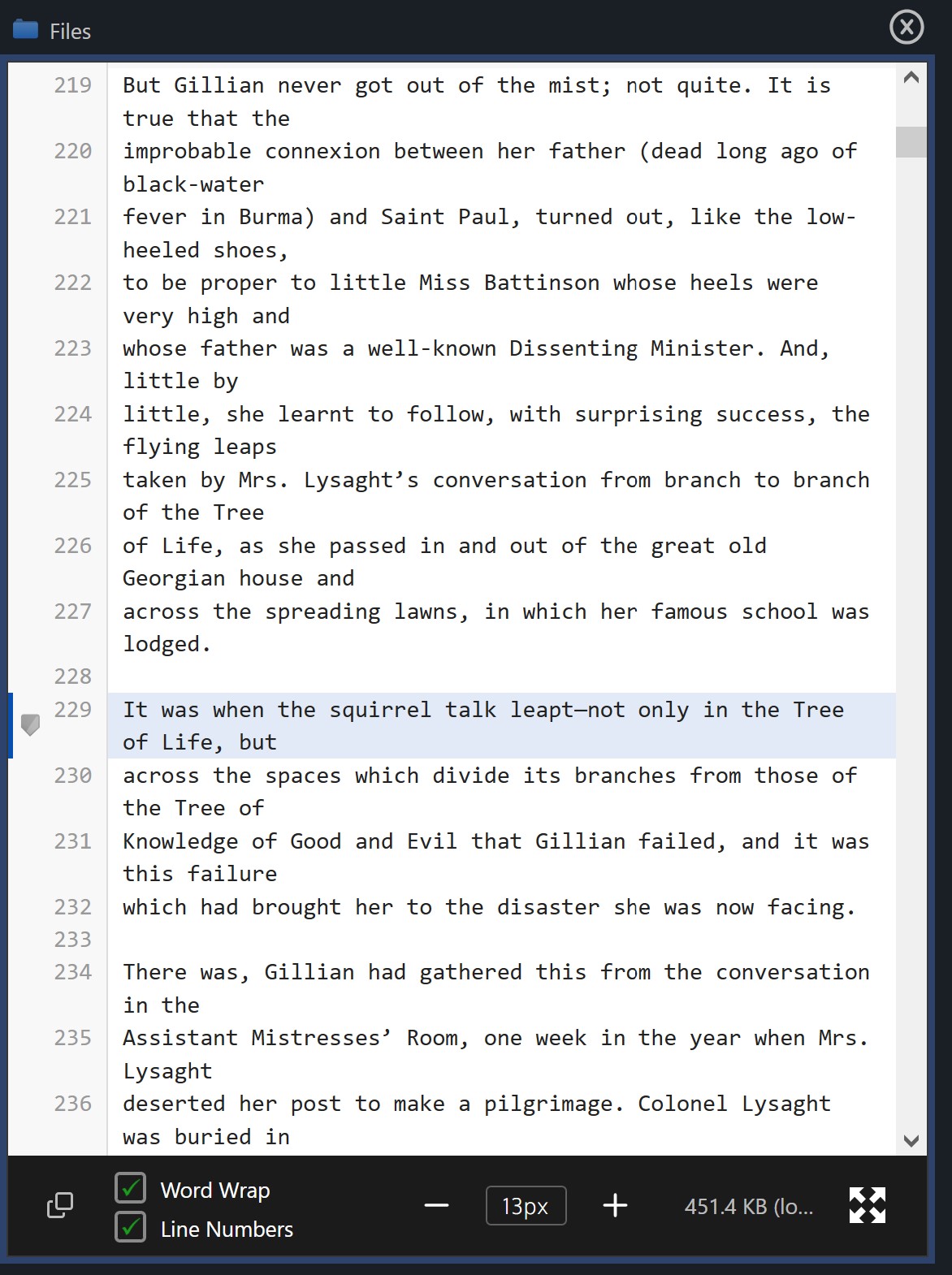
- New file viewers for PDFs and text files, with full screen support for both. The text viewer loads content dynamically, meaning it can display very large files, as well as offering features like line numbers and word wrap
- Annotation overhaul - New shapes including boxes, circles, arrows and text. Shapes can be moved about, resized, and rotated, with full undo and redo. Shape colors are now independent of the comment's color.
- Annotations can be drawn on top of PDFs
- Comments can be added to particular lines of a text file
- New advanced search fields: frame rate, orientation (portrait / landscape) and uploader
- The H.264 level is now shown in the Metadata tab of the player (for new uploads)
- The old and new backends now communicate and synchronize with each other, which fixes an issue where encoding jobs might not start immediately after you set up the encoder
- The player page is no longer static, which means it loads faster and actions like setting workflows or switching between files can happen without a page refresh
- If the player can't play back and it shows a download overlay, it shows a message to explain why it couldn't play (e.g. if "force download" was set on the file)
- You can now click on the duration field of the video player to toggle time remaining
- Player - Allow dot characters when seeking to timecode. Dots at the start skip that digit and make the timecode relative. Dots at the end substitute for 00. So ..10. seeks 10 seconds from the current position
- Player - Shift + T now opens the Seek to Timecode dialog
- Significant accessibility improvements and much improved keyboard navigation
- Support for audio captchas on the login page
- Updated icon used to denote that a file has comments
- Improved the quality of video poster images
- Email - Fixed issue where some emails might not have the custom logo set
- Fixed an issue that could cause thumbnails to appear black in some instances
- Fixed an issue that could cause folders to be unable to be downloaded
- Fixed an issue where Global Search may not return results if caches are not up-to-date
- Captions - Fixed an issue causing imported caption timestamps to drift
- Workflows - Fixed an issue where the approve / reject workflow may not trigger when pressing the approval buttons in some instances
- Fixed an issue that could cause encoding jobs to not be sent to the encoding server
- Fixed an issue causing thumbnails to sometimes display blank
- Lots of small bug fixes, tweaks and optimizations
Changes since 2026.2.1 RC1:
- Player - Added a Copy button to the Seek to Timecode dialog
- Several fixes to the reliability of approval workflows
Kollaborate Encoder 2.1 - Jun 9 2026
- WebP is now used for hoverscrub thumbnails instead of AVIF
- Improved support for handling redirects when communicating with the web server
- Several fixes for jobs looping unnecessarily
- Overhauled the file downloader for improved speed and reliability
- Minor bug fixes, tweaks and optimizations
Kollaborate Server 2026.2.1 RC1 - Jun 9 2026
Important: The Docker image is configured to convert the current database to your MariaDB version automatically. As such, we would recommend backing up the database before upgrading to any version as you may be unable to downgrade otherwise. You can download the current database as a .sql file from the Tools section of the Admin Area. We recommend doing this BEFORE copying the newer version's files over.
Note: This version is a release candidate, meaning we consider it stable and well-tested with no known issues, but continue to monitor it on the cloud. If no new issues are found this will become the stable version.
Changes since Beta 3:
- Player - Being able to show a heatmap for a specific user has been added back in this version. It now appears as a draggable, resizable overlay over the video
- Player - Show heatmaps for audio files
- Player - Fixed an issue that could cause the stated duration to be incorrect
- Player - Various improvements to the Seek to Timecode dialog
- Player - Allow dot characters when seeking to timecode. Dots at the start skip that digit and make the timecode relative. Dots at the end substitute for 00. So ..10. seeks 10 seconds from the current position
- Player - Shift + T now opens the Seek to Timecode dialog
- Player - Improved the reliability of seeking and frame-stepping
- Player - Play videos in true full screen on iOS
- Fixed an issue where Global Search may not return results if caches are not up-to-date
- Captions - Fixed an issue causing imported caption timestamps to drift
- Captions - Various reliability improvements
- Files - Fixed an issue where clicking the path in the player for a link would go to the wrong folder
- Files - Fixed an issue where the color picker was empty
- Workflows - Fixed an issue where the approve / reject workflow may not trigger when pressing the approval buttons in some instances
- Comments - Fixed a layout issue when editing comments
- Fixed an issue that could cause encoding jobs to not be sent to the encoding server
- Raised the rate limit when the encoder uploads the finished file
- Fixed an issue causing heatmaps to sometimes fail to display
- Fixed an issue causing thumbnails to sometimes display blank
- Lots of UI spacing / layout tweaks
Posted by Jon Chappell on Jul 7 2026 to
DR NewsPermalinkKollaborate Server 2026.2.1 - new player and file viewers, side-by-side playback, improved accessibility
Kollaborate Server 2026.2.1 is out of beta and ready for general use. This is a major update to our self-hosted workflow platform with a lot of new features.
New video player and image viewer
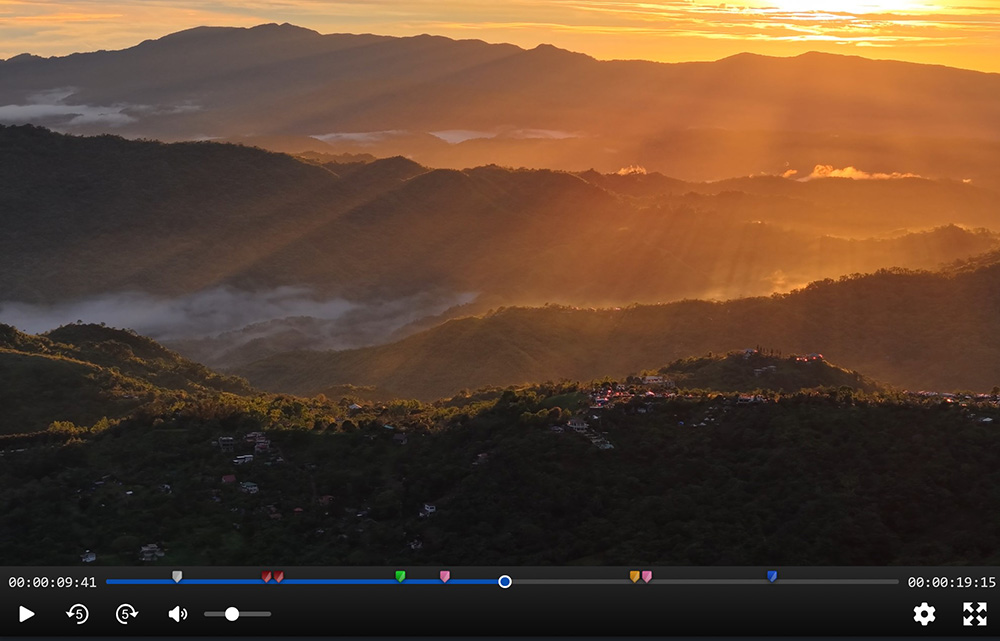
Our video player and image viewer have been completely rewritten from scratch. The new versions are considerably more powerful and easier to use. We’ve made lots of UI improvements and everything feels smoother, more polished and more intuitive.
New controls
There is now a button to skip forward 5 seconds, as well as new keyboard shortcuts comma and period for back and forward 5 secs, respectively. Opening the Seek to Timecode dialog can be accomplished with Shift + T.
The JKL keys function more like an NLE, with slow-mo support when holding K and J or L, as well as fast forward and rewind speeds up to 16x.
You can also change the playback speed separately without having to fast forward.
Switch between proxies and the original file
The new player allows switching between different file proxies, so you can now create multiple proxies and switch between them. It will also allow you to play back the original file (assuming it’s browser-playable) as long as you have download permissions for the file.
Better error handling
The new player is more resilient to playback or network issues. If something does go wrong, error messages are much clearer.
Accessibility
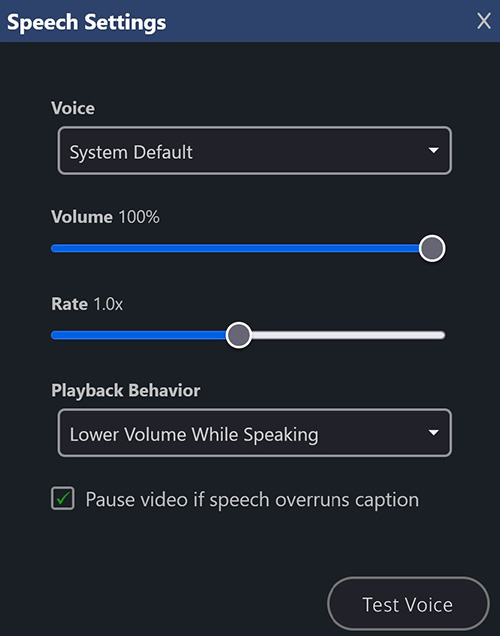
The new player has the ability to speak captions out loud. This allows you to bring in an audio description SRT and have Kollaborate speak it audibly as the video plays.
You can customize Kollaborate’s behavior when speaking captions, including automatically lowering the volume while the caption is spoken, or pausing playback completely. You can also set it to pause playback if the speech overruns the length of the caption and then resume again automatically.
Better mobile support
The player functions better on smaller screens and touch-only devices.
Overlays
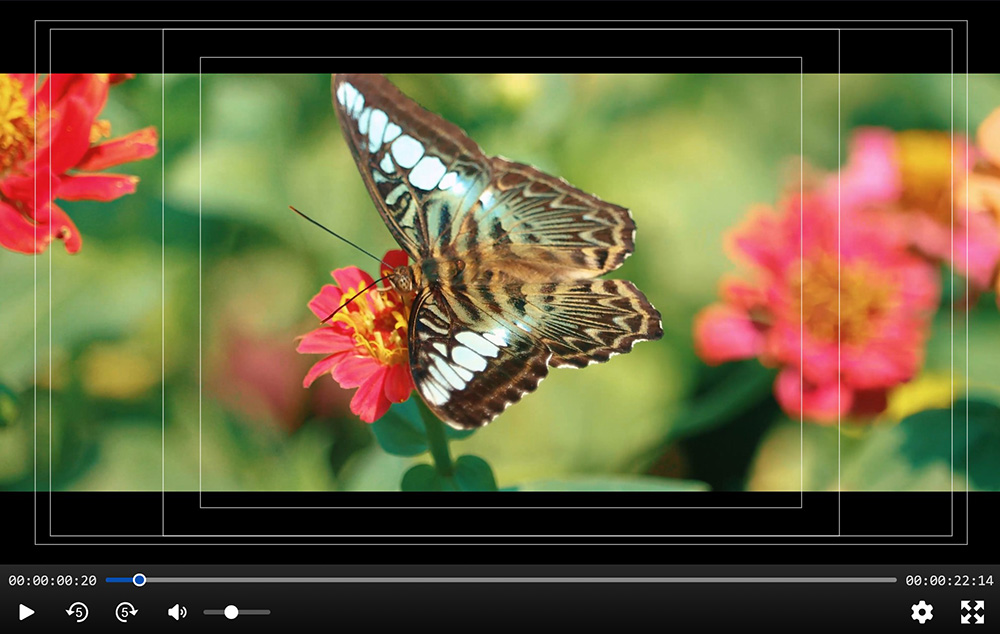
Our new player supports overlaying 4:3 and 16:9 safe areas, as well as various aspect ratio mattes.
Side-by-side comparison
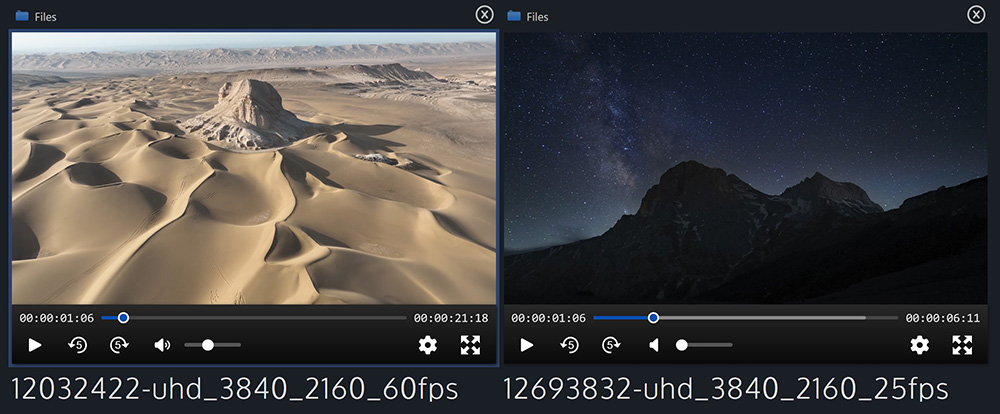
You can load a second file alongside another. You can compare any type of file with another, but if it's the same type it will automatically sync with the other player. Video and audio will sync playheads with each other and switching which file is active will switch audio source. Image viewers will sync zoom and pan position between each other, and document viewers will sync page numbers.
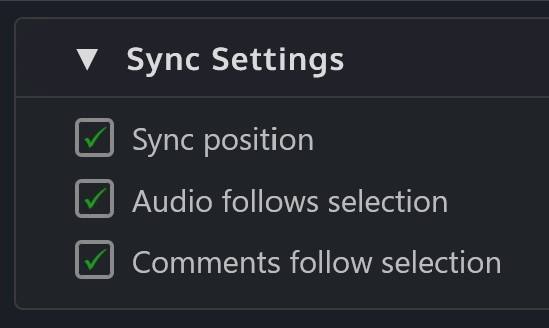
This behavior is customizable via the new Sync Settings panel. You can switch off synchronization and automatic audio and comment switching.
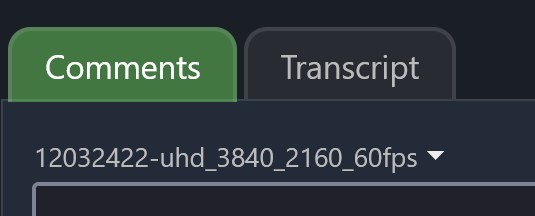
Comments switch automatically depending on which file is active, but you can also manually change this with a new dropdown in the Comments tab.
New document viewer
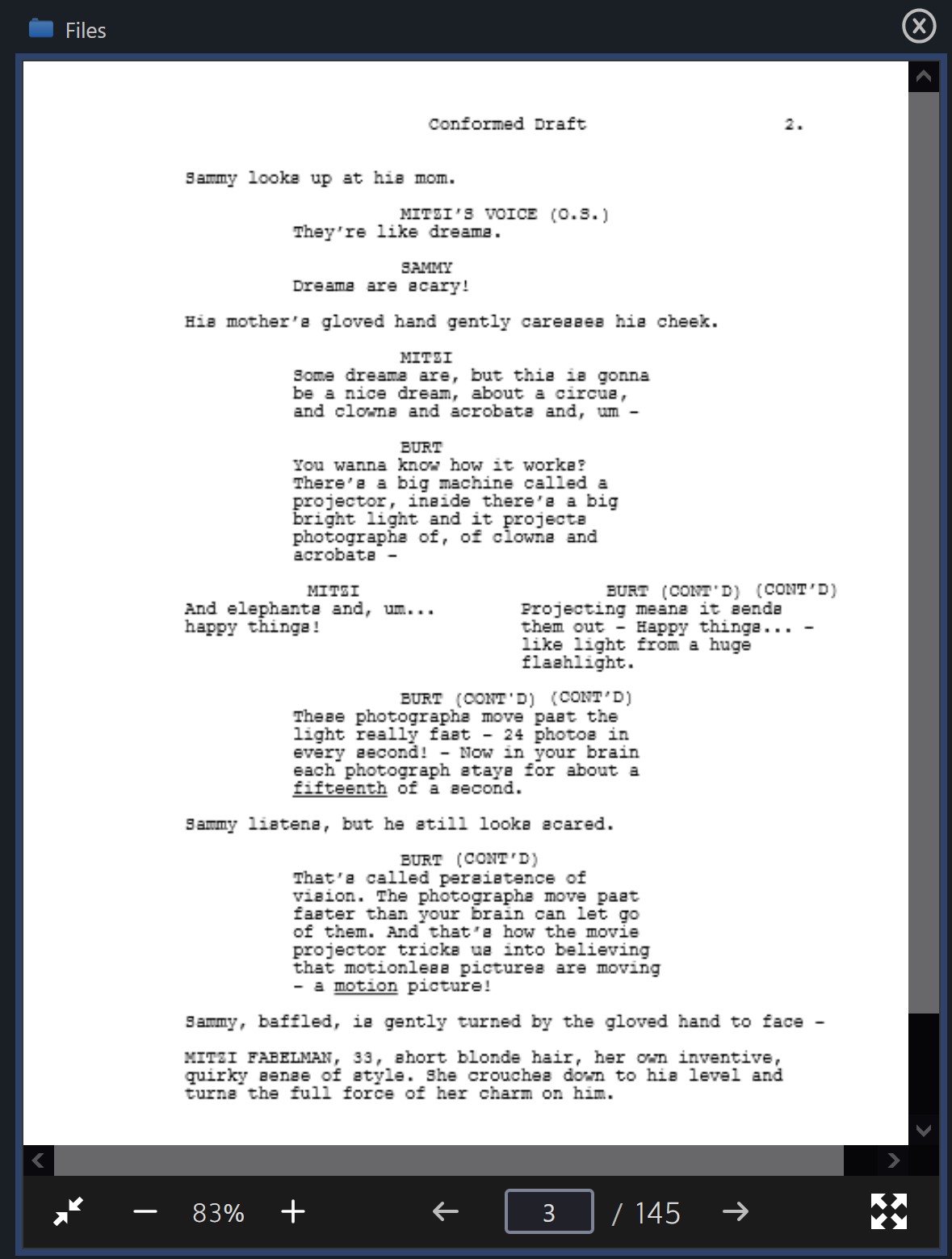
The document viewer for PDFs has been overhauled and now supports full screen and annotations.
New text viewer
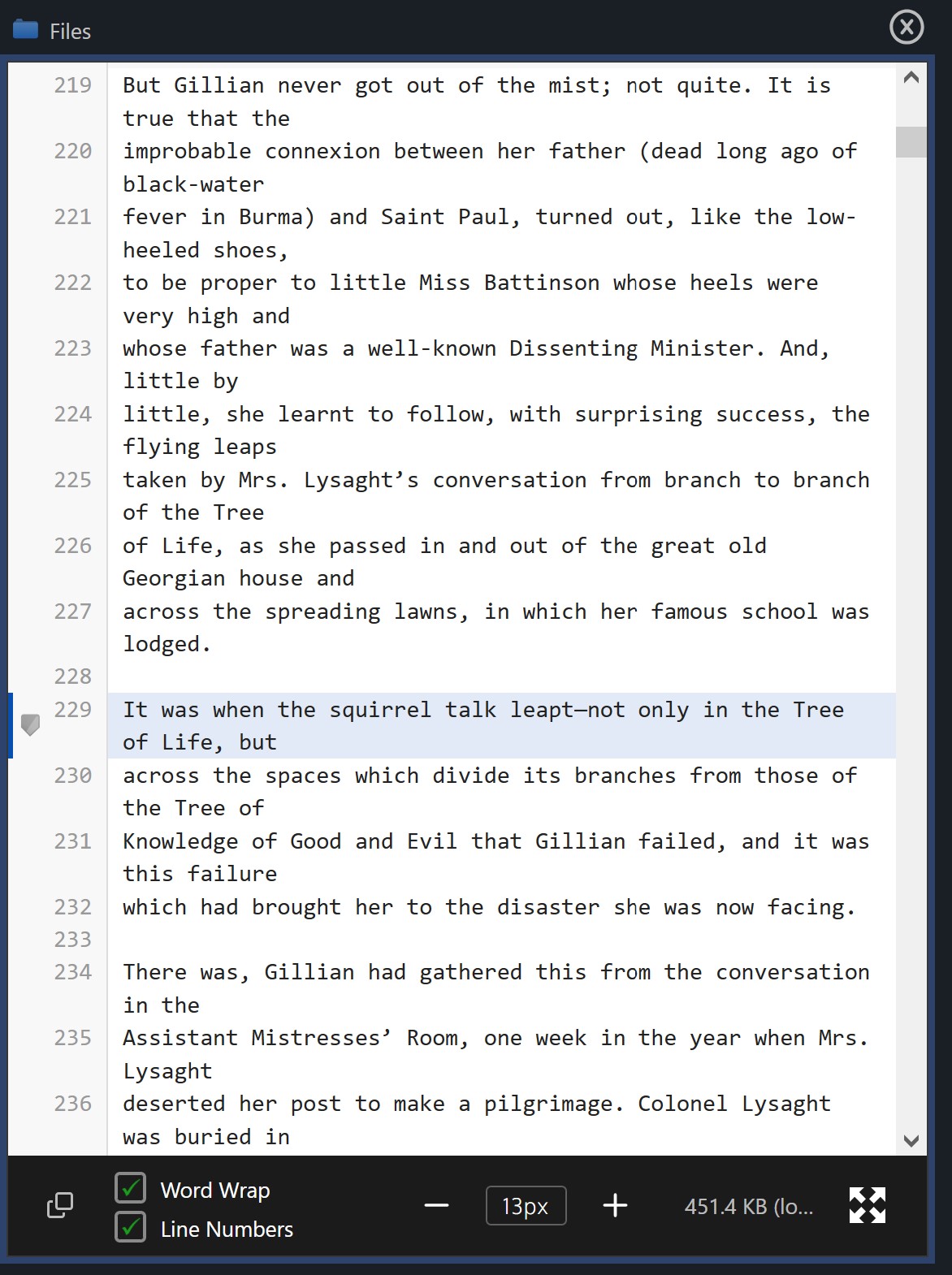
There's a new viewer for text files that supports dynamic loading, meaning it can support very large files. It also supports full screen and there are options for line numbers and word wrap. You can comment on a specific line too.
Annotations
Annotations have been completely overhauled and are considerably more sophisticated now.
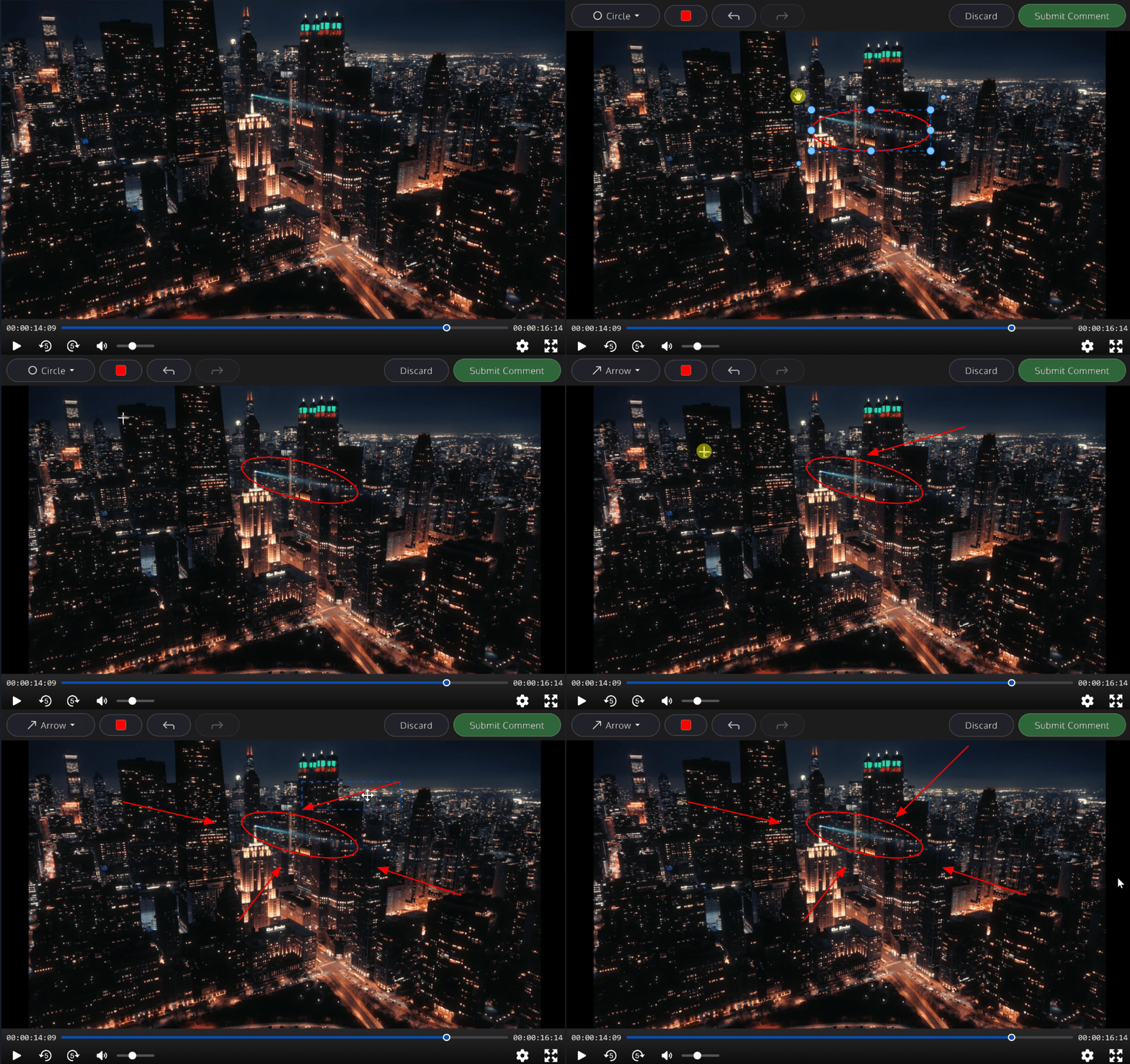
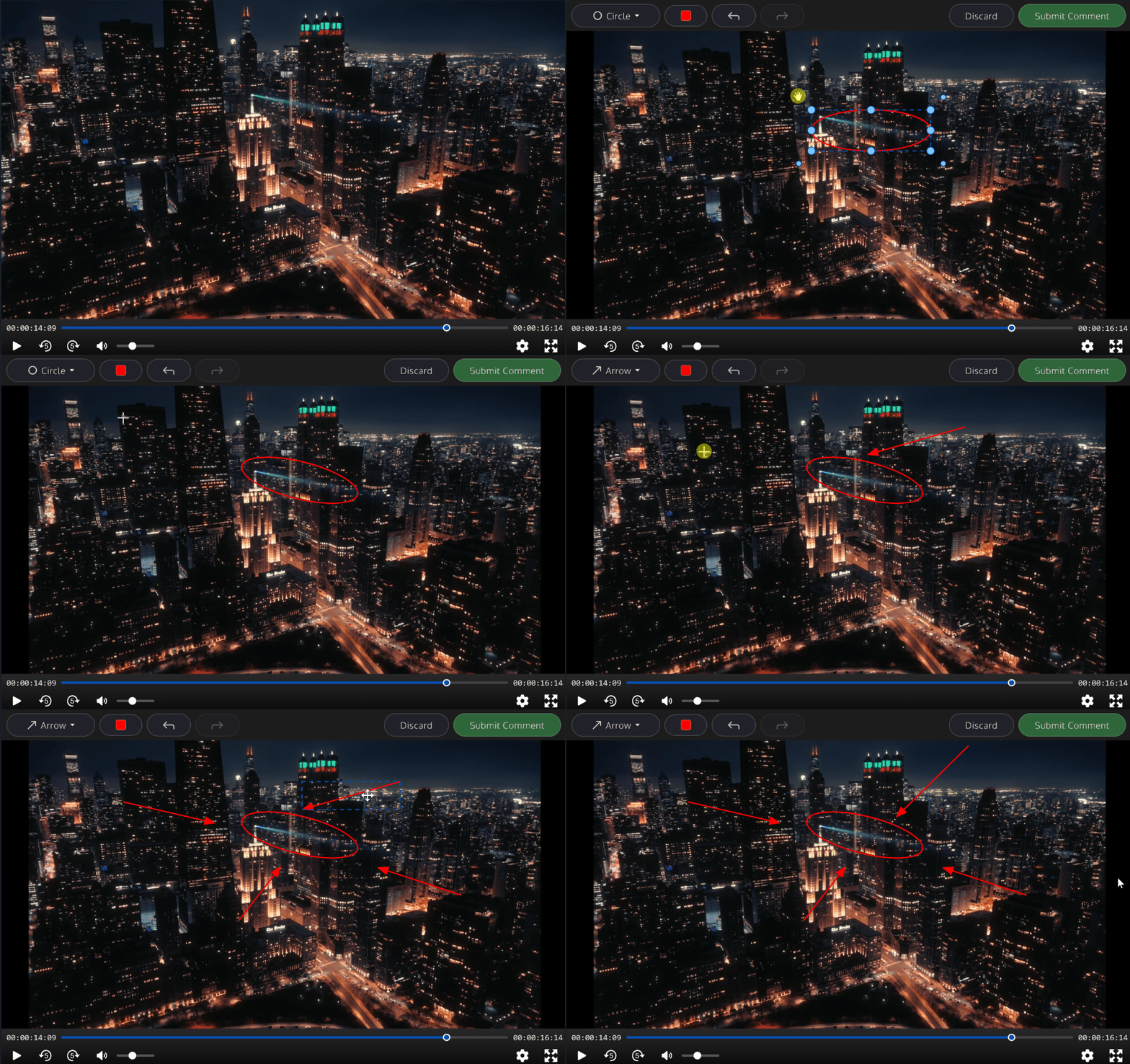
Instead of a basic drawing pen that can’t be edited, we now have multiple tools including boxes, circles and arrows. After drawing, the shape can be moved about, enlarged, rotated or deleted. There is also a text tool that allows you to write directly on the image.
Shape colors are now independent from the comment’s color and different shapes can have different colors. There is also undo and redo functionality.
Improved accessibility
Kollaborate works much better with accessibility tools like screen readers. We also added a lot of quality-of-life improvements for accessibility including additional navigation links for screen readers, improved keyboard navigation, and audio captchas on the login page.
Other changes
- New advanced search fields: frame rate, orientation (portrait / landscape) and uploader
- The H.264 level is now shown in the Metadata tab of the player (for new uploads)
- The old and new backends now communicate and synchronize with each other, which fixes an issue where encoding jobs might not start immediately after you set up the encoder
- The player page is no longer static, which means it loads faster and actions like setting workflows or switching between files can happen without a page refresh
- If the player can't play back and it shows a download overlay, it shows a message to explain why it couldn't play (e.g. if "force download" was set on the file)
- You can now click on the duration field of the video player to toggle time remaining
- Player - Allow dot characters when seeking to timecode. Dots at the start skip that digit and make the timecode relative. Dots at the end substitute for 00. So ..10. seeks 10 seconds from the current position
You can view the full list of changes here after logging in.
Kollaborate Encoder 2.1
We also released a major new version of Kollaborate Encoder recently. New features in this version are:
- WebP is now used for hoverscrub thumbnails instead of AVIF
- Improved support for handling redirects when communicating with the web server
- Several fixes for jobs looping unnecessarily
- Overhauled the file downloader for improved speed and reliability
- Minor bug fixes, tweaks and optimizations
Kollaborate is an essential cloud workflow platform that allows you to share files with clients and team members while integrating with Digital Rebellion apps and services. Kollaborate Server allows you to host the platform in-house on your own servers and storage. To find out more, see the Kollaborate Server overview or register for the free cloud trial (Server trials are available on request).
Posted by Jon Chappell on Jun 24 2026 to
DR News,
Front Page News,
KollaboratePermalinkRecent updates - June 2026
In case you missed it, here are some recent software updates for
our products.
Kollaborate Server 2026.2.1 B3 - May 15 2026
Important: The Docker image is configured to convert the current database to your MariaDB version automatically. As such, we would recommend backing up the database before upgrading to any version as you may be unable to downgrade otherwise. You can download the current database as a .sql file from the Tools section of the Admin Area. We recommend doing this BEFORE copying the newer version's files over.
Note: This version contains major changes to the player page. Although this has been tested extensively, we expect a change this big to still contain bugs in real-world usage and are releasing this version as a beta to get feedback.
Changes since Beta 2:
- The video player will now play VP8, VP9, HEVC (H.265) and AV1 sources if the browser supports it
- Player - Added keyboard shortcuts 1 and 2 for switching the active file in side-by-side playback
- Text Viewer - Preserve scroll position across font / word-wrap changes
- Significant accessibility improvements and much improved keyboard navigation
- Updated icon used to denote that a file has comments
- Player - Changed the plus icon to say "Compare" to make its function more obvious
- Support for audio captchas on the login page
- Support for Synced Sessions in the new player
- Player fixes / improvements for iOS
- Player - Fixed view count increasing by 2 when a file is viewed
- Player - Made transcript use the currently active file
- Player - Fixed issue where adding tags would only add them to the first file
- Player - Fixed issue where captions from one file would be loaded into both files when comparing side-by-side
- Player - Fixed issue where files would sometimes not appear as viewed
- Comments - Fixed timecode holding unnecessarily when pressing Shift or Control
- Email - Fixed issue where some emails might not have the custom logo set
- Improved the quality of video poster images
- Fixed an issue that could cause thumbnails to appear black in some instances
- Workflows - Fixed an issue that could cause a file with Needs Approval set to not show the approval controls in the player in some instances
- Fixed an issue that could cause folders to be unable to be downloaded
- Preview - Fixed issue where controls may not appear when previewing vertical video
- Player - Don't show versions dropdown for links not able to access versions
- Player - Fixed erroneous error message saying you don't have permission to download a file
- Lots of UI spacing / layout tweaks
Posted by Jon Chappell on Jun 7 2026 to
DR NewsPermalinkKollaborate Quarterly Update - Q2 2026
This quarter we introduced some major updates to Kollaborate on the cloud and self-hosted version.
New player and side-by-side comparison
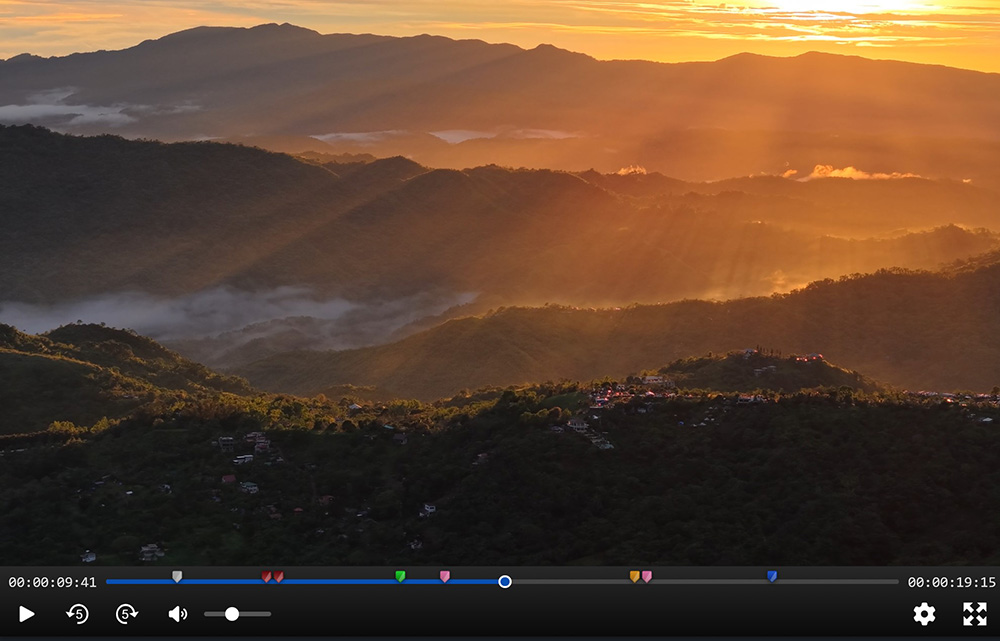
We overhauled our video player with improved polish, new keyboard shortcuts, safe area overlays, aspect ratio mattes and the ability to speak captions or audio descriptions out loud. We also introduced new viewers for images, documents and text files.
Two files of any type can now be compared side-by-side. If they're both video/audio files the playheads will sync.
Major annotation overhaul
You can now add different shapes to an annotation including boxes, circles, arrows, and text. Shapes can easily be moved, scaled and deleted after creation, with undo and redo available. Colors are now per-shape instead of taking the comment's color.
Annotations can now be added to PDF documents too.
Organizations
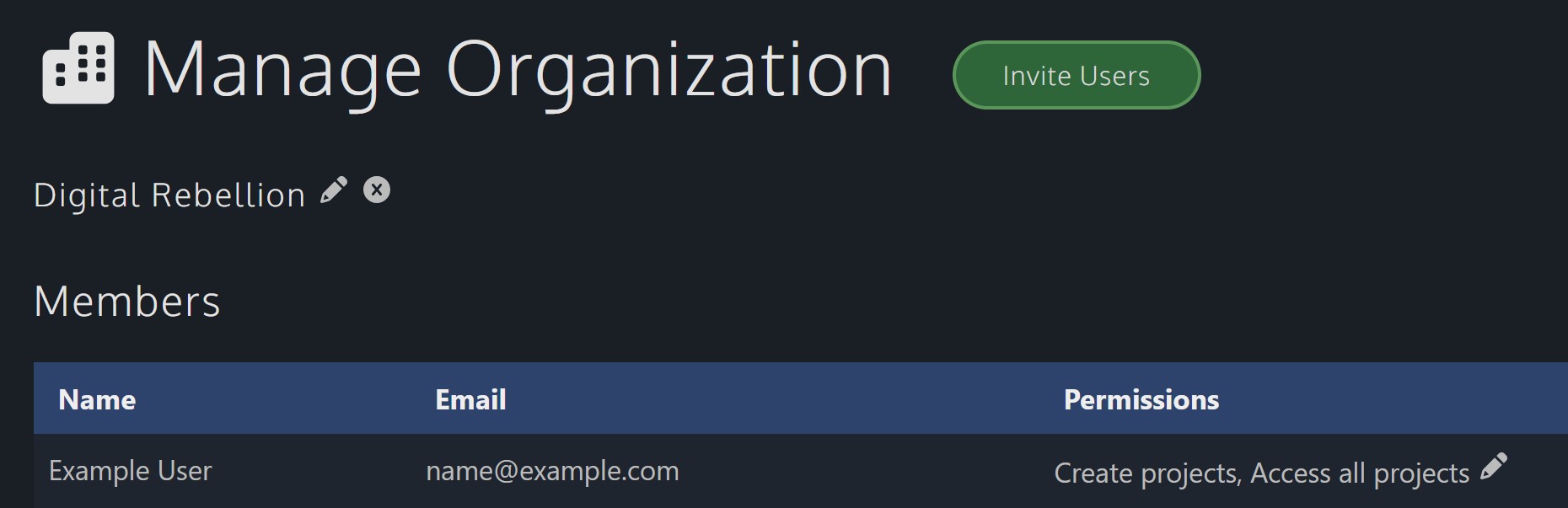
Linked Accounts has been replaced with Organizations on the cloud. At the moment we're just duplicating the old Linked Accounts functionality of allowing users to create and access projects under your subscription, but we plan lots of options in future to make managing a large team with a large number of projects easier.
Coming up next
These new features are in opt-in preview, so our immediate goal is to stabilize the new features and roll them out to everyone. We've had a great response from customers and less than 1% of people who opt in end up opting out for technical or other reasons.
Some of the things we're working on are our new help center, Single Sign-On on the cloud, new workflows, and a captioning overhaul, but not all of these will launch next quarter.
Kollaborate is an essential cloud workflow platform that allows you to share files with clients and team members while integrating with Digital Rebellion apps and services. To find out more, see the overview or register for the free trial.
Posted by Jon Chappell on May 26 2026 to
DR News,
Front Page News,
KollaboratePermalinkRecent updates - May 2026
In case you missed it, here are some recent software updates for
our products.
Kollaborate Server 2026.2.1 Beta 2 - Apr 16 2026
Important: The Docker image is configured to convert the current database to your MariaDB version automatically. As such, we would recommend backing up the database before upgrading to any version as you may be unable to downgrade otherwise. You can download the current database as a .sql file from the Tools section of the Admin Area. We recommend doing this BEFORE copying the newer version's files over.
Note: This version contains major changes to the player page. Although this has been tested extensively, we expect a change this big to still contain bugs in real-world usage and are releasing this version as a beta to get feedback.
Changes since Beta 1:
- Side-by-side comparison - load two players at once and compare them with playback synchronization for video/audio, zoom/pan synchronization for images, and page sync for documents. Switch between comments independently of whichever file is the active file. You can load any type of file alongside another for reference, but only files of the same type can be synchronized.
- New file viewers for PDFs and text files, with full screen support for both. The text viewer loads content dynamically, meaning it can display very large files, as well as offering features like line numbers and word wrap
- Annotations can be drawn on top of PDFs
- Comments can be added to particular lines of a text file
- The player page is no longer static, which means it loads faster and actions like setting workflows or switching between files can happen without a page refresh
- If the player can't play back and it shows a download overlay, it shows a message to explain why it couldn't play (e.g. if "force download" was set on the file)
- You can now click on the duration field of the video player to toggle time remaining
- Fixed an issue where some files would incorrectly appear to be unplayable
- Reduced browser memory usage
- Various UI and styling improvements
- Lots of small bug fixes, tweaks and optimizations
Posted by Jon Chappell on May 7 2026 to
DR NewsPermalinkKollaborate Server 2026.2.1 Beta 2 - side-by-side playback and new file viewers
Kollaborate Server 2026.2.1 Beta 2 was released today as a pre-release version of our self-hosted workflow platform. This builds on Beta 1 which offered a new video player and image viewer.
Side-by-side comparison
You can now load a second file alongside another. You can compare any type of file with another, but if it's the same type it will automatically sync with the other player. Video and audio will sync playheads with each other and switching which file is active will switch audio source. Image viewers will sync zoom and pan position between each other, and document viewers will sync page numbers.
This behavior is customizable via the new Sync Settings panel. You can switch off sychronization and automatic audio and comment switching.
Comments switch automatically depending on which file is active, but you can also manually change this with a new dropdown in the Comments tab.
New document viewer
The document viewer for PDFs has been overhauled and now supports full screen and annotations.
New text viewer
There's a new viewer for text files that supports dynamic loading, meaning it can support very large files. It also supports full screen and there are options for line numbers and word wrap. You can comment on a specific line too.
Overhauled player page
The player page is no longer static, which means it loads faster and actions like setting workflows or switching between files can happen without a page refresh.
Other changes
- If the player can't play back and it shows a download overlay, it shows a message to explain why it couldn't play (e.g. if "force download" was set on the file)
- You can now click on the duration field of the video player to toggle time remaining
- Fixed an issue where some files would incorrectly appear to be unplayable
- Reduced browser memory usage
- Various UI and styling improvements
- Lots of small bug fixes, tweaks and optimizations
Because it's such a large change, we're releasing this update as a beta. Although it's been extensively tested, you should expect bugs in real-world usage.
Kollaborate is an essential cloud workflow platform that allows you to share files with clients and team members while integrating with Digital Rebellion apps and services. Kollaborate Server allows you to host the platform in-house on your own servers and storage. To find out more, see the Kollaborate Server overview or register for the free cloud trial (Server trials are available on request).
Posted by Jon Chappell on Apr 16 2026 to
Kollaborate,
DR News,
Front Page NewsPermalinkRecent updates - April 2026
In case you missed it, here are some recent software updates for
our products.
Kollaborate Server 2026.2.1 Beta 1 - Apr 1 2026
Important: The Docker image is configured to convert the current database to your MariaDB version automatically. As such, we would recommend backing up the database before upgrading to any version as you may be unable to downgrade otherwise. You can download the current database as a .sql file from the Tools section of the Admin Area. We recommend doing this BEFORE copying the newer version's files over.
Note: This version contains major changes to our video player and image viewer. Although this has been tested extensively, we expect a change this big to still contain bugs in real-world usage and are releasing this version as a beta to get feedback.
Changes:
- This version features a brand new video player and image viewer with an improved user interface and features like switching between proxies, better error handling and error messages, speaking captions out loud for accessibility, better mobile support, and the ability to add overlays like safe areas and aspect ratio mattes
- Annotation overhaul - New shapes including boxes, circles, arrows and text. Shapes can be moved about, resized, and rotated, with full undo and redo. Shape colors are now independent of the comment's color.
- New advanced search fields: frame rate, orientation (portrait / landscape) and uploader
- The H.264 level is now shown in the Metadata tab of the player (for new uploads)
- The old and new backends now communicate and synchronize with each other, which fixes an issue where encoding jobs might not start immediately after you set up the encoder
- Lots of minor tweaks and optimizations
Posted by Jon Chappell on Apr 7 2026 to
DR NewsPermalinkKollaborate Server 2026.2.1 Beta 1 - major player and annotation overhaul
Kollaborate Server 2026.2.1 Beta 1 was released today as a pre-release version of our self-hosted workflow platform.
New video player and image viewer
Our video player and image viewer have been completely rewritten from scratch. The new versions are considerably more powerful and easier to use. We’ve made lots of UI improvements and everything feels smoother, more polished and more intuitive.
New controls
There is now a button to skip forward 5 seconds, as well as new keyboard shortcuts comma and period for back and forward 5 secs, respectively.
The JKL keys function more like an NLE, with slow-mo support when holding K and J or L, as well as fast forward and rewind speeds up to 16x.
You can also change the playback speed separately without having to fast forward.
Switch between proxies and the original file
The new player allows switching between different file proxies, so you can now create multiple proxies and switch between them. It will also allow you to play back the original file (assuming it’s browser-playable) as long as you have download permissions for the file.
Better error handling
The new player is more resilient to playback or network issues. If something does go wrong, error messages are much clearer.
Accessibility
The new player has the ability to speak captions out loud. This allows you to bring in an audio description SRT and have Kollaborate speak it audibly as the video plays.
You can customize Kollaborate’s behavior when speaking captions, including automatically lowering the volume while the caption is spoken, or pausing playback completely. You can also set it to pause playback if the speech overruns the length of the caption and then resume again automatically.
Better mobile support
The player functions better on smaller screens and touch-only devices.
Overlays
Our new player supports overlaying 4:3 and 16:9 safe areas, as well as various aspect ratio mattes.
Annotations
The biggest overhaul is to the annotation system.
Instead of a basic drawing pen that can’t be edited, we now have multiple tools including boxes, circles and arrows. After drawing, the shape can be moved about, enlarged, rotated or deleted. There is also a text tool that allows you to write directly on the image.
Shape colors are now independent from the comment’s color and different shapes can have different colors. There is also undo and redo functionality.
Other changes
- New advanced search options: frame rate, orientation (portrait / landscape) and uploader
- The H.264 level is now shown in the Metadata tab of the player (for new uploads)
- The old and new backends now communicate and synchronize with each other, which fixes an issue where encoding jobs might not start after you set up the encoder
- Minor bug fixes and improvements
Because it's such a large change, we're releasing this update as a beta. Although it's been extensively tested, you should expect bugs in real-world usage. While we think the new player is a big step up in usability, we're interested in feedback on the new changes, especially for uncommon workflows.
Kollaborate is an essential cloud workflow platform that allows you to share files with clients and team members while integrating with Digital Rebellion apps and services. Kollaborate Server allows you to host the platform in-house on your own servers and storage. To find out more, see the Kollaborate Server overview or register for the free cloud trial (Server trials are available on request).
Posted by Jon Chappell on Apr 1 2026 to
DR News,
Kollaborate,
Front Page NewsPermalink
 KollaborateCloud platform for pro video
 Pro Maintenance ToolsMaintain, optimize and troubleshoot your editing system
 Pro Media ToolsMedia and workflow management for video pros
 CinePlayProfessional video player
 Post HasteCreate projects from customizable templates
 Preference ManagerTrash, backup, lock and restore preferences for your video apps
 FCS RemoverUninstall Final Cut Studio and FCPX
 Cut Notes
 CinePlay
 Aspect Ratio Matte Generator
 Video Space Calculator
